
There are no items in your cart
Add More
Add More
| Item Details | Price | ||
|---|---|---|---|

How containerization actually gets used in production — from microservices and CI/CD pipelines to cloud migration and machine learning workflows. A practical, engineer-focused guide.
|By Affordable AI, Nagpur
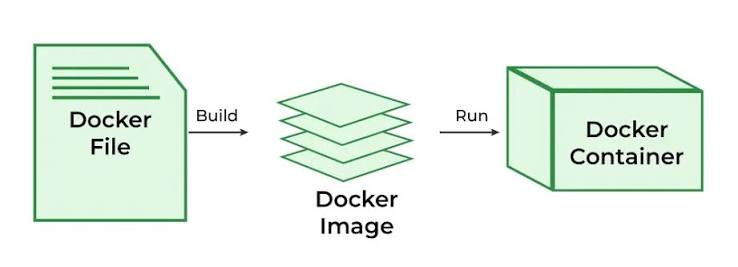
Before containers, "it works on my machine" was the most common sentence in every engineering team's history. Applications behaved differently across development, staging, and production because each environment had its own operating system version, libraries, and configuration. Docker removes that inconsistency by packaging an application together with its dependencies into a single, portable unit called a container.
Four components work together to make containerization possible in any production environment.
A text file with step-by-step instructions describing how to build an image — base OS, dependencies, source code, and startup command.
A read-only snapshot built from the Dockerfile. It's the blueprint that gets shipped and run anywhere Docker is installed.
A running instance of an image — isolated, lightweight, and fast to start compared to a full virtual machine.
A storage hub (like Docker Hub or a private registry) where teams push and pull images across environments and CI/CD pipelines.
These are the most common ways engineering teams use Docker today, across startups and large enterprises alike.
Each service (auth, payments, notifications) runs in its own container, deployed and scaled independently without affecting the rest of the system.
Build once, test in an identical container, and deploy the exact same image to staging and production — eliminating environment drift.
Containers run the same way on AWS, Azure, GCP, or on-prem, making cloud migration and multi-cloud strategies dramatically simpler.
New developers run docker-compose up and get the entire stack — database, cache, backend — running locally in minutes.
ML models are packaged with exact library and CUDA versions, so training and inference environments stay identical from laptop to GPU cluster.
Old monolithic apps get containerized as a first step toward modernization, without rewriting the entire codebase immediately.
Lightweight containers run efficiently on edge devices and gateways, enabling consistent app updates across thousands of remote devices.
Orchestrators like Kubernetes or Docker Swarm spin up extra containers automatically during traffic spikes, then scale back down.
QA teams spin up isolated, disposable containers to test features safely without touching shared infrastructure.

Many large-scale platforms rely on containerization to manage complex, high-traffic systems reliably.
| Industry | Typical Use of Docker | Business Benefit |
|---|---|---|
| Streaming & Media | Hundreds of independent microservices for recommendations, playback, and billing | Faster feature releases, isolated failures |
| Fintech & Payments | Isolated, auditable containers for transaction processing services | Stronger security boundaries, easier compliance |
| E-commerce | Auto-scaling containers during sales and traffic surges | Reliable uptime during peak demand |
| Ride-hailing & Logistics | Real-time location and matching services in containers | Low-latency, independently scalable services |
| Enterprise IT | Containerizing legacy Java/.NET monoliths | Modernization without full rewrites |
Here's a simplified but realistic multi-container setup for a web app with a database and cache layer:
version: "3.9"
services:
  web:
    build: ./app
    ports:
      - "8080:80"
    environment:
      - NODE_ENV=production
    depends_on:
      - db
      - redis

  db:
    image: postgres:16
    volumes:
      - db_data:/var/lib/postgresql/data
    environment:
      - POSTGRES_PASSWORD=secret

  redis:
    image: redis:7-alpine
    ports:
      - "6379:6379"

volumes:
  db_data:
Running docker-compose up -d spins up the entire application stack — web server, database,
and cache — in one command, exactly the same way on every developer's machine and in production.
Prefer alpine or slim variants to reduce image size and attack surface.
Separate the build environment from the runtime environment to keep final images lean and secure.
Use environment variables or secret managers instead of hardcoding credentials into a Dockerfile.
Avoid relying only on latest; use versioned tags for predictable, reversible deployments.
Define HEALTHCHECK instructions so orchestrators know when a container is truly ready.
Combine RUN commands and clear package caches in the same layer to keep images small.
| Challenge | Real-World Solution |
|---|---|
| Container sprawl at scale | Orchestration platforms like Kubernetes or Docker Swarm to manage scheduling and scaling |
| Persistent data storage | Docker volumes and managed cloud storage instead of writing to the container's writable layer |
| Networking between services | Docker's internal DNS and service discovery, or a service mesh for larger systems |
| Image security vulnerabilities | Automated image scanning tools integrated into the CI/CD pipeline |
| Monitoring container health | Centralized logging and metrics tools such as Prometheus and Grafana |
A common point of confusion: Docker builds and runs individual containers, while Kubernetes orchestrates many containers across many machines — handling scaling, self-healing, and load balancing automatically. Most real-world production systems use both together: Docker to build and package, Kubernetes (or a simpler tool like Docker Swarm) to run everything reliably at scale.
Understanding Docker conceptually is only step one. Building, deploying, and scaling real containerized applications is where the skill actually sticks — and that's exactly what our hands-on course walks you through.
 Launch your Graphy